Compare drawing revisions when the sheet layout has moved
Comparedrawing aligns issued drawing PDFs by their geometry, helping engineers review the changes that matter when views, scale or page position have changed.
Before a drawing revision is released, every intended change is carefully marked in the drawing: a revision cloud around the edit, a new line in the revision table, a note describing the change. Your review team then checks the marked changes and approves the release.
When the supplier finds a change nobody marked
The supplier opens your design change and notices something that was not marked. A dimension has moved, a tolerance differs, or a note has changed without a revision cloud around it.
In the best case, this leads to unnecessary iterations and back-and-forth between engineering, purchasing and the supplier. In the worst case, the part is produced with the unintended change, and tooling worth millions may already have been ordered.
The review covered every marked change. The unmarked one was never on the list.
Why existing tools miss unmarked changes
Finding an unmarked change means comparing the whole sheet, not only the areas someone marked. Side-by-side review on two screens depends on the reviewer spotting the difference by eye. A PDF overlay helps only while the two revisions share the same layout.
Why a PDF overlay shows everything as changed
A PDF overlay uses page position as its reference. When a view has moved, the revision table has grown or the sheet is plotted at a different size, the same geometry appears as two sets of lines:
- dimensions appear doubled
- title-block content appears changed
- view outlines produce large highlighted areas
- a changed tolerance or hole position disappears in the noise
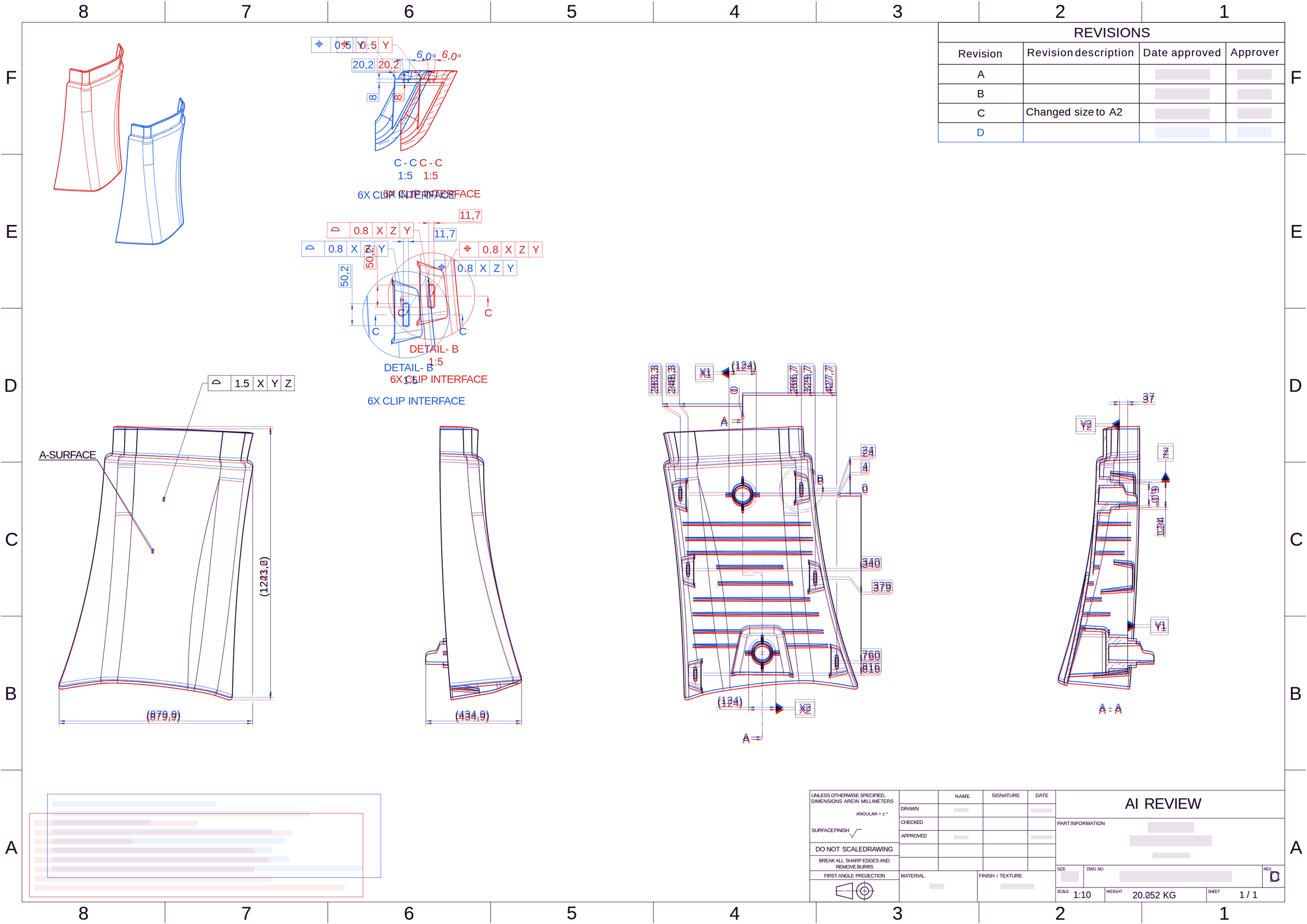
The unmarked change is somewhere in that picture, but the layout has become the dominant difference.
How to compare two PDF drawing revisions with Comparedrawing
Comparedrawing compares the whole sheet, not only the areas someone marked. It takes two steps:
- Upload the original and the revised PDF.
- Get the differences, annotated directly on the drawing.
Marked and unmarked changes are annotated the same way, so your review team sees both before the release is approved.
How the alignment works
Comparedrawing uses machine learning models based on deep neural networks and computer vision to align the two sheets automatically. The models recognize the drawing geometry instead of comparing pixels at fixed page positions. A moved view or a sheet plotted at a different size is therefore matched as the same geometry, and the comparison reports the changes to the drawing content itself.
The models are predictive, not generative. They detect and align what is already on the drawing and do not create or alter drawing content. Because Comparedrawing works with the issued PDFs, you can compare drawings without access to the CAD source files.
What the reviewer does with the result
Each annotated area gives the reviewer a focused starting point to:
- open the area at drawing scale
- check the changed geometry, dimension, tolerance or note
- confirm whether the change was intended and marked
- record the decision with the release or engineering change record
Comparedrawing does not approve a change. The engineering team still decides whether it is acceptable and what follow-up is needed.
Request access
If your team approves drawing revisions before they reach suppliers and production, request access to Comparedrawing. Feel free to reach out, and we will be happy to show how it fits your drawing-review process!